


Gulf Pay
4.7273.00 Reviews
App Specs
- Version
- 26.5.0
- Updated On
- License
- Free
- Downloads
- 100,000+
- Developer
- PAR Retail
- Categories
- Auto & Vehicles
- Platform
- Android
Screenshots
 Analysis by AppCompare
When I’m deciding whether to use a phone app at the pump, convenience is only part of the question. I also want to know whether it fits the stations I actually visit, whether it can make an ordinary stop feel simpler, and whether I’m comfortable relying on my phone when I need fuel. Gulf Pay is a payment app from PAR Retail in the Auto & Vehicles category, built around Gulf stations rather than every place that sells fuel. That focus is its main appeal, but it is also the first thing I’d check before making it part of my routine.
Start with the station you use
The practical test is straightforward: are Gulf stations already convenient for your regular drives? If one is on your commute or near the places you visit, paying from your phone may remove a small but recurring interruption. If Gulf is rarely where you stop, the app is less likely to change your day, no matter how polished the experience feels. I’d treat station fit as more important than the general promise of mobile payment.
For a new user, a sensible first try is a low-pressure visit to a Gulf station you already know. Take a moment to check the app before pulling up to a pump, and keep your usual payment method available until you have completed a successful purchase. That isn’t a criticism of the app; it is simply a good way to avoid turning a quick fuel stop into a test of your patience when you are in a hurry.
What phone payment changes at the pump
The appeal is not that fueling becomes a different activity. It is that the payment step can happen through the phone instead of requiring you to reach for a card or cash. When the app and pump work together as intended, the steps are easy to understand: choose the station, identify the pump in the app, and proceed with fueling. For someone who makes frequent stops at participating Gulf locations, shaving friction from that familiar sequence can be more valuable than a long list of extra functions.
There is a useful distinction between paying by phone and simply having a digital wallet on your device. A general wallet may be a convenient way to pay at many businesses, while Gulf Pay is aimed specifically at Gulf fuel purchases and related products. Neither approach is automatically better. I’d choose the one that suits the stations I actually use, and I’d keep a backup payment option rather than assuming a phone will always be the easiest choice.
A routine that suits regular Gulf customers
Consider a weekday commute: you notice the fuel level is low, stop at a Gulf station on the usual route, and use the app to handle the pump payment. The benefit is modest but practical. You do not have to search through a bag for a card, and the transaction record can make it easier to review fuel spending later. That history is especially useful if you are trying to understand how much your regular driving costs, though it is not a substitute for a complete household budget.
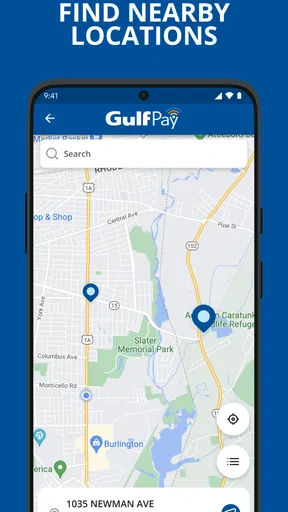
On a road trip, the station-finder can help when you want to locate a Gulf stop rather than guessing from memory. I would use it as a planning aid, not as the only navigation tool: check the route before you are nearly out of fuel, and have a second plan if the nearest listed location is not convenient. That small habit makes the map feature more useful and avoids putting unnecessary pressure on a single app during a long drive.
Worth Reading Before You Choose

EA SPORTS FC Mobile 26 Is a Bigger Football Game, but It Takes Time

Flipboard Shows What News Apps Must Do Beyond the Feed

Switching to Android Auto Means Rethinking Your Driving Routine

Google Calendar Makes a Crowded Week Easier to Manage

Ludo King Makes the Most of the Minutes Between Plans

Baby Panda World Brings Quick Play to Modern Phones, but Its Game Library Feels Busy
Where the trade-offs become clear
This is not a universal fuel-payment solution. If your preferred stations are not Gulf locations, or you usually choose a station based on whichever is closest, a general payment method may be a better fit. Likewise, someone who prefers cash, does not want to manage payment details in a fuel app, or is uncomfortable depending on a phone at the pump may find little reason to switch. The right choice depends on the way you already buy fuel, not on the assumption that app-based payment is always faster.
I would also avoid budgeting around a particular reward until I had checked what the app currently shows for my account and purchase. Rewards and discounts can add value when they are available and relevant, but they should be treated as a bonus rather than the reason to rely on the app. The same cautious approach applies to any payment workflow: get comfortable with the steps during an ordinary visit, and do not make your first attempt when you are rushed or your phone battery is low.
With an average rating of 4.8 from around 2,500 ratings, and over 100,000 installs, it has found an audience among drivers. Those figures are encouraging context, not a guarantee that every station visit will be effortless. The app is free, rated for Everyone, and its current version is 26.2.999; it was released on November 9, 2022, and requires Android 9 or later. Those basics make it approachable for many Android users, while the actual value still comes down to whether Gulf fits your routes.
Using Gulf Pay in Everyday Driving
I find the most useful way to judge a fuel-payment app is to think about the moment before a stop: whether I know which station I’m heading to, have enough time to check the pump details, and can still pay another way if my phone isn’t ready. That small bit of preparation can make a phone-based purchase feel routine instead of rushed. It also helps explain why the app’s value depends so much on the routes I drive.
Setup and the first transaction
First things first, downloading Gulf Pay is as easy as pie. Just hop onto your app store of choice, whether you're an Android aficionado or an iOS enthusiast, and you’re just a tap away. The installation process is straightforward, and before you know it, you’re ready to fuel up with a swipe of your screen.
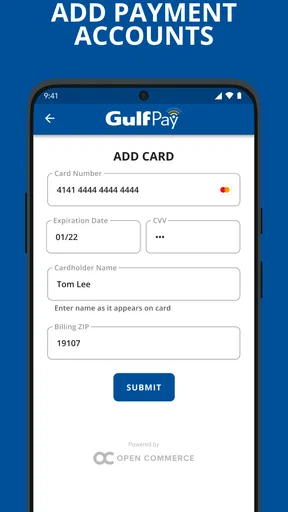
Once you have the app, setting up your account is a breeze. Gulf Pay asks for the usual suspects like your email, a strong password, and some basic personal info. Linking your payment method is a cinch, too, whether you prefer a credit card or PayPal. The app’s user interface is clean and intuitive, so even if you’re not tech-savvy, you’ll feel right at home.
At the pump and on the road
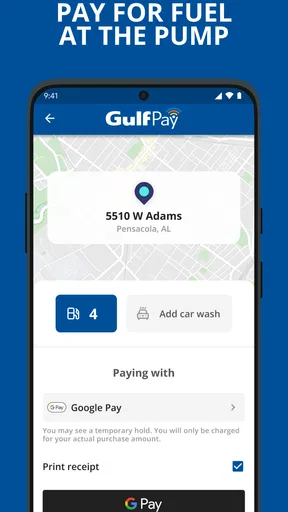
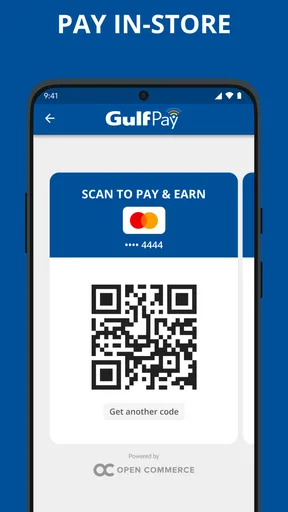
Using Gulf Pay is where the app really shines. Imagine pulling up to your local Gulf station, selecting your pump number in the app, and voilà – you’re fueling up in seconds. The app communicates directly with the pump, so there’s no need to fumble with cash or cards. It’s all about convenience, and I must say, it’s quite liberating.
One small workflow tip makes this feel less hurried: identify the pump number before opening the payment screen, then double-check it before authorizing the transaction. It is an easy detail to overlook when several pumps are close together. If anything about the displayed pump does not match where you parked, pause and verify rather than proceeding on autopilot. That quick check matters more than trying to make the transaction feel instant.
Finding stops and reviewing spending
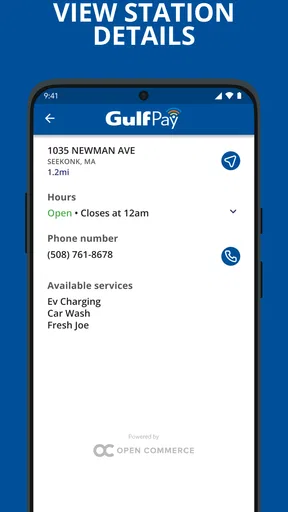
One of the coolest features of Gulf Pay is its ability to find the nearest Gulf stations. With a built-in map, you can effortlessly locate a station, which is perfect for those road trips or when you’re running on fumes. Plus, the app keeps track of your transaction history, which can be a lifesaver when you're trying to manage your budget.
I find those two tools more useful when they work together. Before a longer drive, look for a Gulf stop while you still have plenty of fuel, then use the transaction history afterward to keep an eye on what the trip cost. The map helps with the immediate decision; the history helps with the later one. Neither replaces planning, but together they make the app more than a button for paying at a pump.
Rewards without relying on them
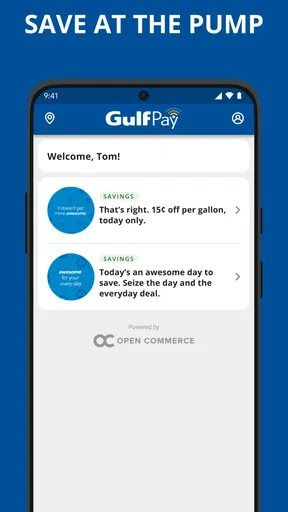
The app also offers rewards and discounts, which is a sweet bonus. Regular users can earn points redeemable for discounts on fuel purchases. So, not only do you save time, but you also save a few bucks along the way.
I would think of rewards as an extra, not a promise that every fill-up will be cheaper. Before changing where you buy fuel, compare the stop’s convenience with any benefit shown in the app and decide whether the detour is worth it. A discount only helps if the station suits your route and the offer applies to the purchase you planned to make. This keeps the decision grounded in your real driving habits rather than the appeal of collecting points.
Security and a sensible backup
Security is a huge concern when dealing with digital payments, and Gulf Pay doesn’t skimp on this front. The app uses encryption to keep your payment details safe, and there’s the added layer of using your phone’s biometric authentication for added security. It’s reassuring to know that my financial information is protected.
Even when a payment app feels dependable, I would keep a backup card or another familiar payment method available. Phones can run low on battery, connectivity can be inconvenient, and a pump-side transaction is not the moment I want to troubleshoot. That backup does not cancel out the convenience; it lets me use the app when it is the smoothest option without making the entire fuel stop depend on a single device.
Who should choose it—and who should not
Gulf Pay makes the most sense for drivers who regularly pass Gulf stations, prefer handling fuel purchases on a phone, and value having transaction history close at hand. It can also suit someone who is trying to simplify a shared routine, such as remembering which payment method was used for a work commute or a regular household car. The app’s focused purpose is a strength for those users because it keeps the decision tied to a familiar brand of station.
I would skip it if Gulf locations are inconvenient, if you rarely buy fuel, or if your current payment routine already works well and you do not want another account to manage. Drivers who prioritize broad flexibility across different fuel brands may be better served by a general wallet or by paying directly with their preferred method. A specialized app earns a place on my phone when I use the network often enough; otherwise, it can become one more icon I have to maintain.
There is also a difference between trying the app and fully switching to it. On the first visit, I would confirm that the station appears in the app, make sure the selected pump is correct, and complete a normal purchase while keeping a backup payment method nearby. Afterward, check that the transaction appears in the history. That simple first-use routine gives you a practical sense of whether the setup, pump interaction, and record-keeping suit you before you depend on them during a rushed stop.
The verdict
After using Gulf Pay, it’s clear that this app is a game-changer for anyone who frequents Gulf gas stations. It brings a level of convenience that transforms an everyday chore into a seamless experience. With its user-friendly interface, rewards program, and robust security measures, it’s hard not to recommend Gulf Pay to anyone looking to simplify their fueling routine.
So, next time you’re at the pump, remember, there’s no need to dig for loose change or fumble with your card. Just whip out your phone and let Gulf Pay do the work. Trust me, once you start using it, you’ll wonder how you ever did without it!
Pros
- User-friendly interface makes navigation easy.
- Secure transactions with advanced encryption.
- Fast processing of payments and transfers.
- Supports multiple payment methods.
- Real-time transaction notifications.
Cons
- Limited availability in certain regions.
- Requires stable internet connection.
- Occasional app crashes reported by users.
- No offline transaction option available.
- Customer support response times can vary.
FAQs for Gulf Pay
What is Gulf Pay and what does it offer?
Gulf Pay is a mobile app designed to streamline your fueling experience at Gulf gas stations. It allows users to pay for fuel directly through the app, locate nearby Gulf stations, and access exclusive promotions and discounts. The app aims to make transactions quicker and more convenient, enhancing the overall fueling experience.
Is Gulf Pay available for both Android and iOS devices?
Yes, Gulf Pay is available for both Android and iOS platforms. You can download the app from the Google Play Store for Android devices or the Apple App Store for iOS devices. Ensure your device meets the minimum OS requirements for a seamless experience with the app.
How does the payment process work with Gulf Pay?
Gulf Pay integrates secure payment methods, allowing users to link their credit or debit cards directly within the app. Once at a Gulf station, you can select your pump number and authorize payment through the app. This contactless payment method is designed to be fast, secure, and hassle-free.
Are there any special deals or rewards for using Gulf Pay?
Yes, Gulf Pay often features exclusive promotions and discounts for its users. By utilizing the app, you can access special offers, earn rewards points, and receive notifications about upcoming deals at Gulf stations. This makes Gulf Pay not only convenient but also a money-saving tool for frequent users.
What security measures does Gulf Pay implement?
Gulf Pay prioritizes user security by implementing advanced encryption methods to protect your payment information. The app also requires authentication, such as a PIN or biometric verification, to ensure that only authorized users can make transactions. Regular updates help maintain high security standards.


